
Developer tool
2026 · VS Code Extension
Extension Sorter
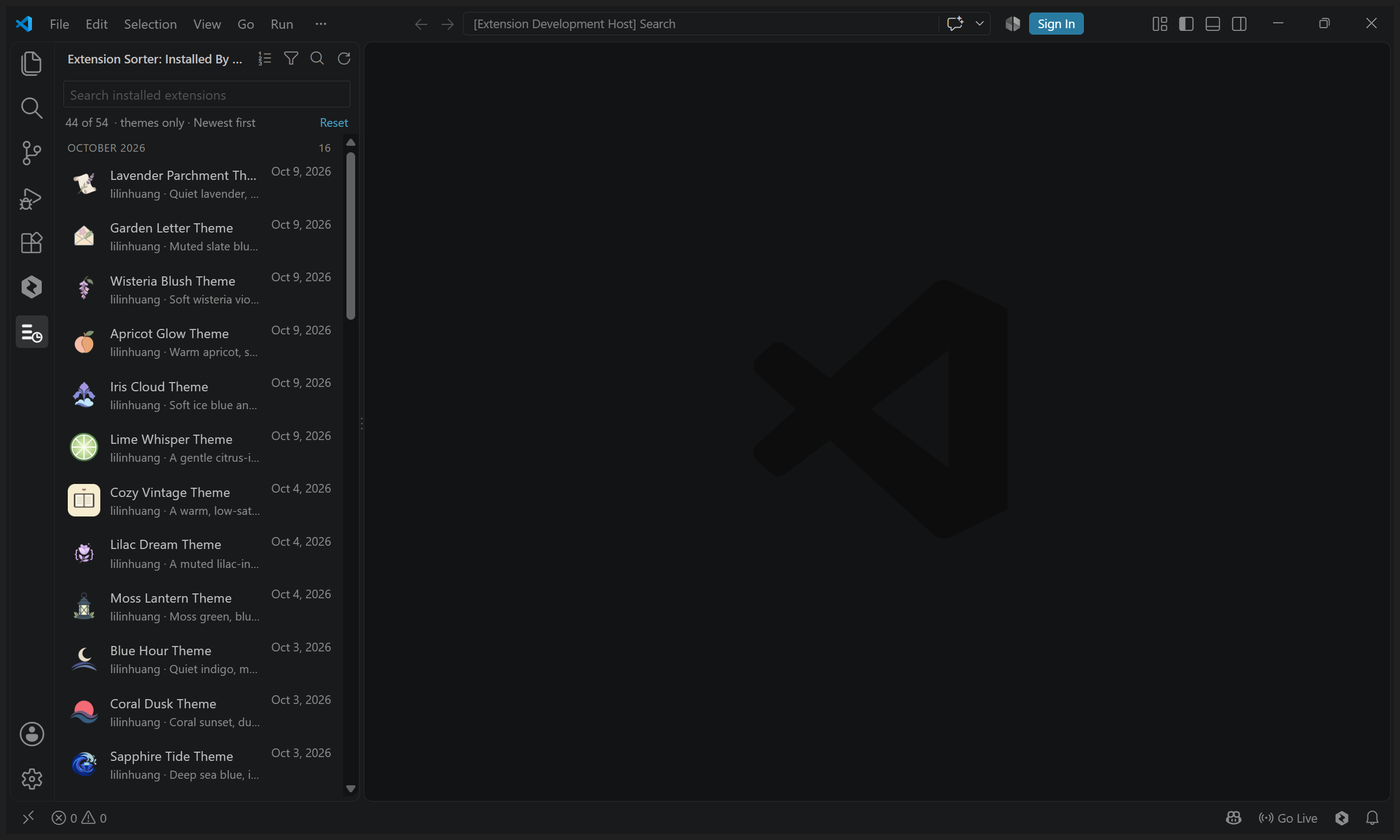
A VS Code extension that lists what you have installed in the order you actually installed it — so finding the theme you just added stops being a hunt.
- Year
- 2026
- My role
- Product definition · UX · Development · Launch
- Platform
- VS Code Extension
01
The problem
It started with my own theme workflow. Publishing themes means installing VSIX files over and over to check them, and VS Code's built-in Extensions view keeps every theme, tool and package in one long list. Its install-date sort only works inside that list, and there is no way to ask "what did I install last week?". So every check meant scrolling the whole list again.
02
Product approach
Extension Sorter adds a view of its own in the activity bar, built around that single question: a rich list grouped by month, sorted newest or oldest installed first, with theme-only and non-theme filters, search over name, publisher and id, and one click from a row to VS Code's native details page. Because VS Code exposes no public install-time API, the extension resolves each date through a chain of sources and labels which one produced it.
03
Key product decisions
01
Say where the date came from
Every row carries a label — Installed, Estimated, First seen or Unknown — so a date users can question beats a number that quietly looks official.
02
A list, not a second manager
The view stays read-only and stays close to the built-in list: it never installs, disables or removes anything on your behalf.
03
Nothing leaves the machine
No telemetry and no network calls — it only reads the extensions VS Code already has installed, their folders and its own state.
04
From friction to launch
01
Hit the friction
After a handful of VSIX installs during a theme batch, hunting for the newest one in a single long list had become the annoying part of the job.
02
Make the date honest
Chained five date sources with visible labels, kept a first-seen history so uninstalling does not erase when you got something, and hid built-ins by default.
03
Prove it survives
55 unit tests plus an integration run that drives real VS Code windows through an isolated profile to verify the sort order and the history persist, then shipped 1.0.0.
05
What I learned
When the platform will not hand you the data, deriving it is only half the job — the other half is being honest about confidence. Labelling where each install date came from turned a guess into something users can reason about.